

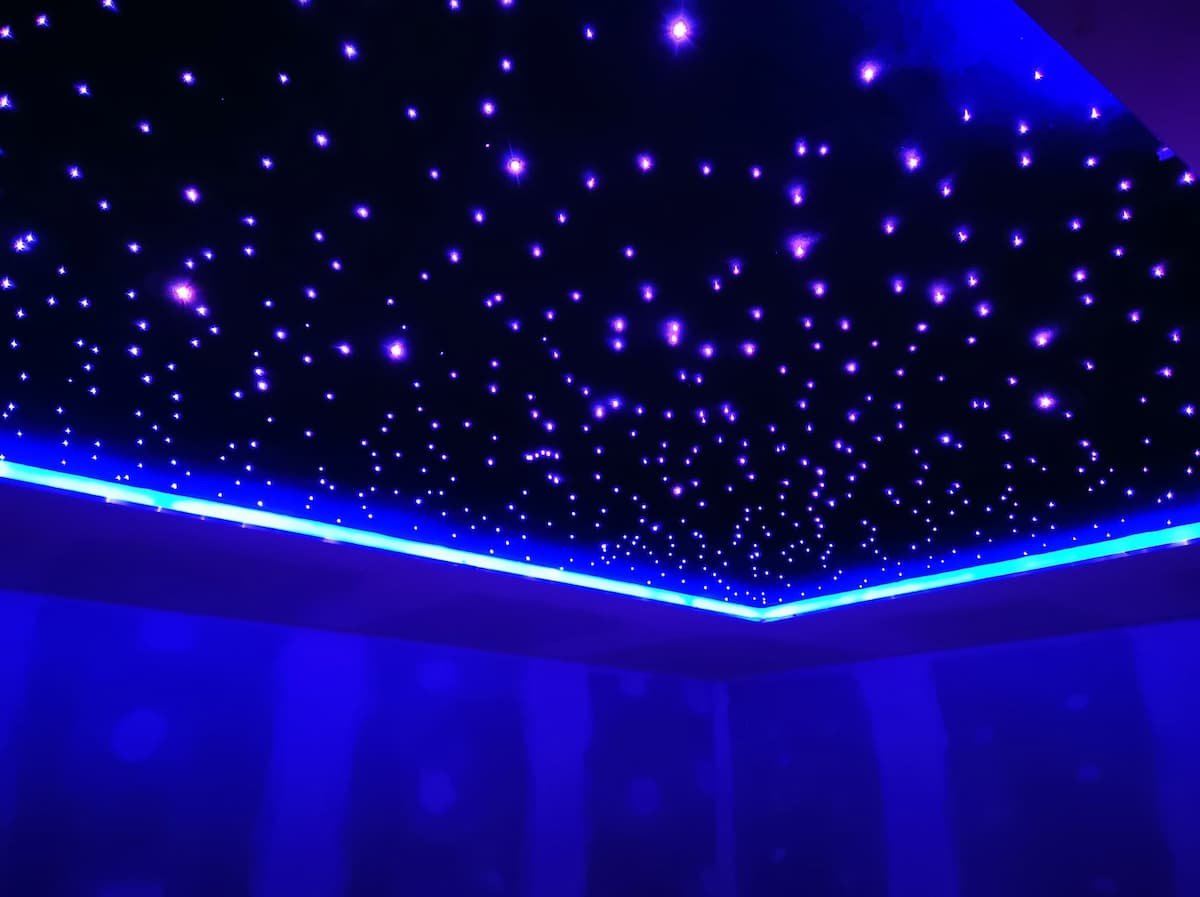
Complete DIY planning and installation guide
If you want to know how to make a star ceiling to create the night sky in your home, you’re in the right place. A fibre optic lighting kit from Stellar Lighting Ltd. will make the process of embarking on a fun and exciting DIY star ceiling project easy.
Do you dream of turning your living room, bedroom or home theatre into a breathtaking starlit oasis? Our DIY fibre optic lighting kits make creating your own celestial masterpiece easier than ever before.
In this step-by-step guide, we are going to explain everything you need to know to plan, prepare, build, install, and enjoy a stunning fibre optic star ceiling in your home or business, regardless of whether it's a small or large-scale project.
This updated guide now also explains how to choose the right fibre optic star ceiling kit before walking you step-by-step through the installation process.

What’s covered in this post?
1. Discover the magic of a DIY star ceiling
2. Planning your star ceiling project
2.1 Determine your ceiling size
2.3 Select light engine features
2.4 Find compatible fibre bundles
2.5 Popular scenarios and recommendations
3. Preparing for fibre optic star ceiling installation
3.1 Getting started with the installation
3.2 Electrical work safety advice and preparation
Step 8: Secure the fibres
Step 9: Tidy up time!
Step 10: Secure the board to the ceiling
Step 11: Cover the screws
Step 12: Cut the fibres
Step 13: Finish – turn on the lights
1. Discover the magic of a DIY star ceiling
Unleash your creativity and transform any room in your home or business into a mesmerising starry night with our DIY fibre optic star ceiling kit. Here's what makes it so special:
Easy to install: Our kit comes with everything you need to get started, and our step-by-step guide makes the installation process a breeze. No need to hire a professional; you can do it yourself!
Elevate your home design: Create an enchanting ambiance and elevate your home design to new heights with our stunning star ceiling. It's a unique and captivating addition that will leave your guests in awe.
Safe and reliable: Rest assured, our DIY fibre optic lighting kit is designed with safety in mind. Just follow the simple instructions, and you'll have a safe and beautiful star ceiling in no time.
Endless customisation: With our kit, you have the freedom to customise your star ceiling exactly as you envision it. Create realistic constellations, twinkling starry sky lights, shooting star effect, space lighting or anything else you can imagine.
Versatility: Whether you want to create a starlit bedroom, a magical home theatre, or a dreamy home office, our DIY kit can bring the stars to any space. Unlike ready-made panels, this is the best option for large ceiling projects as the individual fibres can be spread across the entire surface without any visible joins or seams.
Cost-effective: best for tight budgets, or creative, custom skies. You can tailor star patterns, sizes and placement, and use as little as 100-300 GBP to start.
If you don’t have the skills or time for a DIY project, have limited space, or don’t have loft access, our made-to-order single panels offer a beautiful alternative. From £1,000, you can create a striking feature in a nursery, reading nook, or any small area. It’s an elegant way to bring the magic of the night sky into your home with minimal effort.
2. Planning your star ceiling project: Choosing the right DIY fibre optic star ceiling kit
Not sure which setup is right for you? Here’s a quick-reference summary to help you decide.
On smaller screens, scroll across to compare all details.
| Desired effect | Star density | Light engine features | Fibre type |
|---|---|---|---|
| Realistic Night Sky | 50-100 fibres/m² | RGBW + Twinkle | Mixed Diameters (0.75mm, 1mm, 1.5mm) |
| Subtle Ambient Effect — over bunk beds, low ceilings or special applications | 25-50 fibres/m² | White or RGBW | Primarily smaller diameters (0.75mm); consider our car kits with 0.5–0.75mm fibres |
| Dramatic Home Cinema | 75-100+ fibres/m² | RGBW + Twinkle + App Control | Mixed Diameters |
| Kid's Room Constellations | 50-75 fibres/m² | RGBW + Twinkle + App Control | Mixed Diameters |
| Northern Lights Effect | Use alongside chosen star density | Compatible light engine port | Side-sparkle mesh — see FAQs for more details |
| Shooting Star Effect | Added to chosen star density | Separate shooting-star light engine | Sequential fibre groups — see FAQs for more details |
2.1 Determine your ceiling size
First, measure the length and width of the ceiling area you want to cover with stars.
2.2 Choose your star density – Fibre count per m² for DIY star ceilings
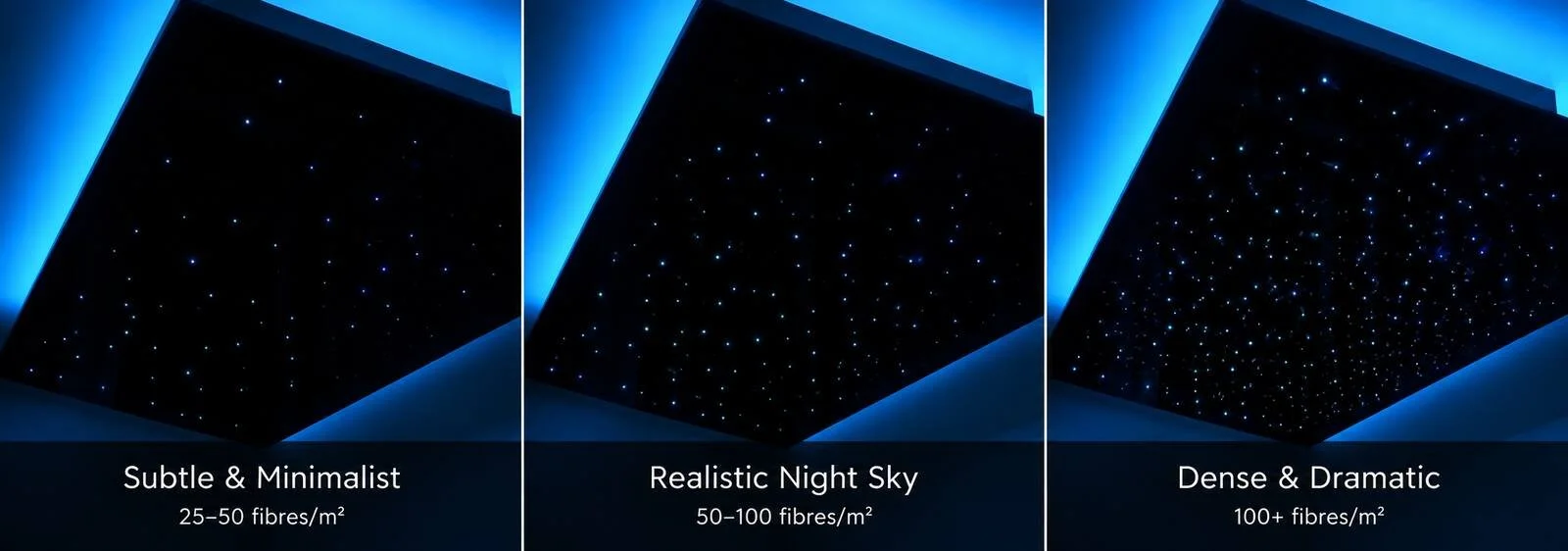
Decide how many “stars” (optical fibres) you want per square metre. This is a key creative decision.
Subtle & Minimalist (25-50 fibres/m²): Creates a gentle, ambient effect that doesn't overwhelm the space.
Realistic Night Sky (50-100 fibres/m²): This is our most common recommendation for an immersive, natural-looking starry sky.
Dense & Dramatic (100+ fibres/m²): Perfect for dedicated home cinemas, feature ceilings, or designs that include fibre optic lettering, logos or graphics, where a higher fibre count is needed for detailed patterns and a truly breathtaking impact.
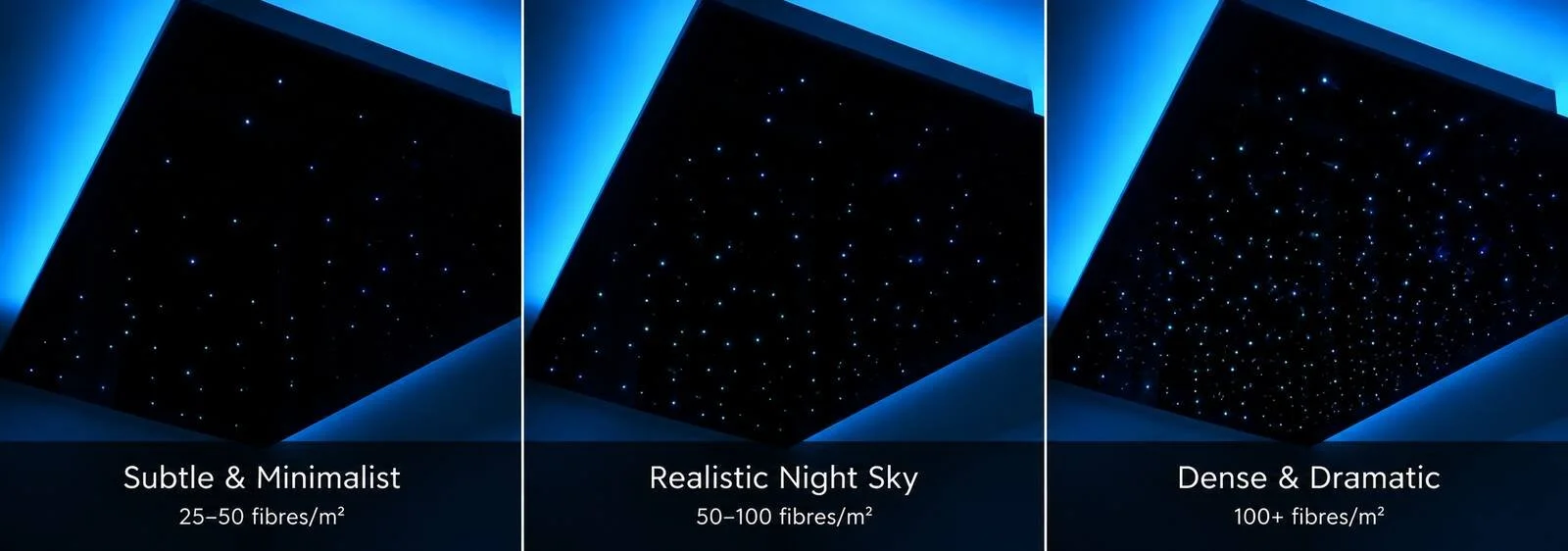
A higher density creates a richer effect but requires more fibres, more installation time, and a more powerful light engine, which increases the cost.
Let's walk through an example:
Your Ceiling Area: 2.5 metres wide × 4 metres long = 10 square metres (m²).
Your Desired Density: You want a rich, realistic effect, so you choose 80 stars per square metre.
Total Fibres Needed: 10m² × 80 fibres/m² = 800 fibres.
Now you know you need a kit—or a combination of light engines and bundles—that can accommodate 800 fibres, either as a single 800-fibre bundle or as 2 × 400-fibre bundles (see the notes on dual-port light engines below).
2.3 Select light engine features for your needs
Choose the features you want in your light engine (illuminator), considering both functionality and available space:
Max Fibre Capacity: The light engine's port inner diameter determines how many fibres it can hold. You must choose an engine that can accommodate the total number of fibres you calculated in step 1.
18mm Port: Holds up to 330 mixed diameter fibres.
20mm Port: Holds up to 400 mixed diameter fibres.
29mm Port: Holds up to 800 mixed diameter fibres.
30mm Port: Holds up to 1000 mixed diameter fibres.
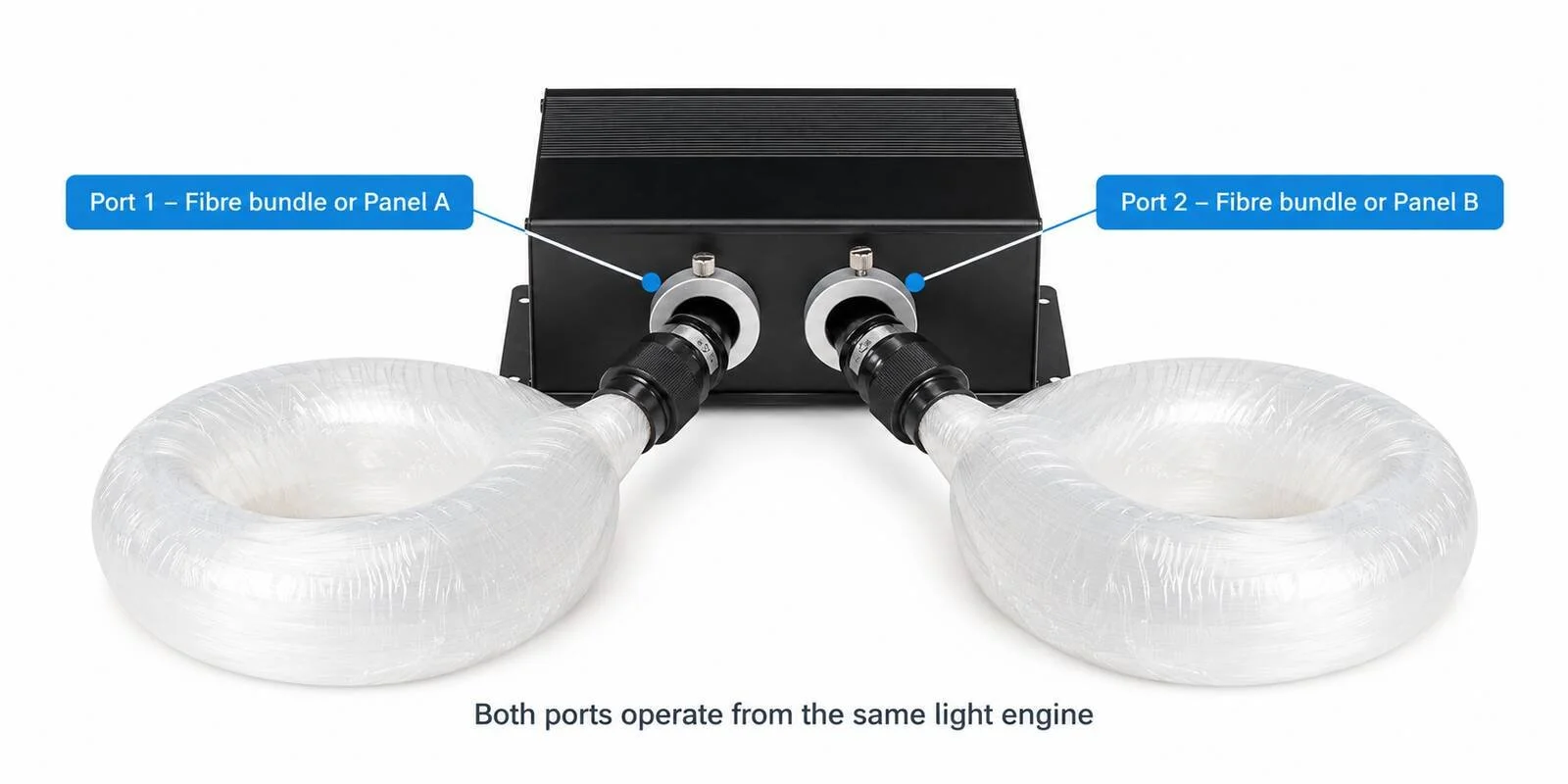
Dual Port Models: Some 18mm and 20mm models have two ports, doubling their total fibre capacity. In many cases, two smaller bundles are easier to handle than one large bundle. If the fibres are divided across two panels, dedicating one bundle to each panel can also make lifting, positioning and securing the panels easier.
Light Engine Size: If space is limited (e.g., in a narrow ceiling void), select a compact model.
Light Colour Options:
White: Classic, pure starlight.
RGB (Red, Green, Blue): Allows you to create millions of colours, perfect for themed rooms or mood lighting.
RGBW (RGB + a dedicated White chip): This is our top recommendation. It gives you all the colour-changing fun of RGB, plus a pure, natural white that looks far more realistic for a starry sky than the mixed white from an RGB engine.
Twinkle Effect: A small internal wheel rotates to create a gentle shimmer, mimicking the atmospheric distortion that makes real stars appear to twinkle. This is the most popular feature for a realistic effect.
Shooting Star Effect: This feature creates a dynamic meteor effect across your ceiling. Because it is produced by multiple groups of fibres lighting up in sequence, it requires a separate shooting-star light engine and fibre bundle. See the FAQs for available options.
Bluetooth App Connectivity: Easily control colours, brightness, and effects from your smartphone.
DMX Compatibility: For larger projects, DMX-compatible light engines can be linked together in master–slave mode so they operate in sync. Advanced users can also integrate the star ceiling with other smart-home or professional DMX512 lighting systems.

2.4 Find compatible fibre bundles
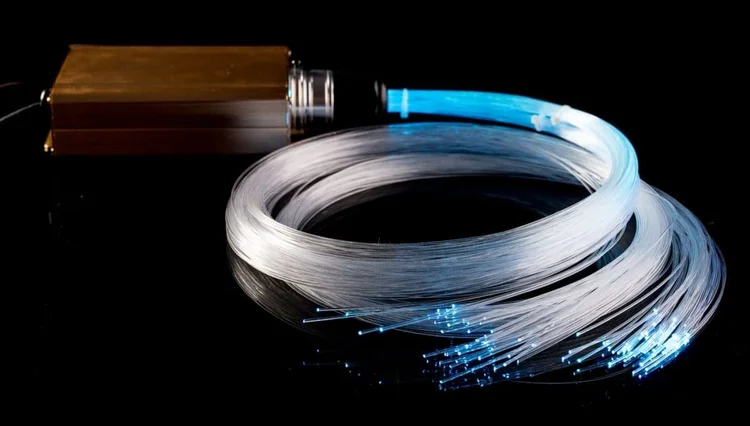
Once you know your total fibres needed and have chosen a light engine, it's time to select the fibre bundle.
Compatibility: Ensure the bundle's connector fits the port on your chosen light engine. Most of our kits are sold with a compatible engine and bundle. Tip: Each light engine product page includes links to compatible fibre optic bundles, making it easier to match the correct connector size and fibre capacity.
Fibre Diameters: Most bundles include mixed diameter fibres (e.g., 0.75mm, 1.0mm, 1.5mm) to create a natural, three-dimensional effect with brighter "closer" stars and dimmer "distant" ones.
Fibre Length: Choose a bundle with lengths that can reach from your planned light engine location to the furthest corner of your star ceiling area.
Tip: It is wise to choose a bundle with a higher fibre count and longer length than your initial calculations suggest. This gives you the flexibility to drill more holes for a denser effect if desired, while any extra fibres can simply be left on the back of the panel. Adding more fibres to a bundle later is difficult and often impossible if the port is at full capacity, but extra length can always be easily trimmed after installation.
Remember to plan a location for the light engine that is dry, well-ventilated, and accessible for any future maintenance.
In some cases, we sell the light engines bundled with the optical fibres; for other products, choose a compatible bundle and add it separately to your shopping basket. Check the contents listed on your chosen product page before ordering.
Our Light engine summary table allows you to compare the light engines by features and maximum bundle capacity, while the Fibre optic bundle summary table shows you the available bundle options with details on fibre count, diameter and length.
For more guidance and to use our light engine selector tool, visit our DIY Fibre Optics Star Ceiling page or contact us for personalised advice.
2.5 Popular scenarios & recommendations
To help you choose, here are some common projects and our recommended setups:
On smaller screens, scroll across to compare all details.
| Project | Recommended density | Key light engine features | Why it works |
|---|---|---|---|
| The Ultimate Home Cinema | 75-100+ fibres/m² | RGBW, Twinkle, App/DMX | The high density and realistic twinkle create a completely immersive movie experience. RGBW allows for perfect white stars or coloured mood lighting. |
| The Relaxing Bedroom Oasis | 50-75 fibres/m² | RGBW, Twinkle | Creates a serene, magical atmosphere perfect for unwinding. The twinkle effect adds a calming, dynamic element without being distracting. |
| The Fun Kid's Bedroom | 50-75 fibres/m² | RGB, App Control | Kids love changing the colours. You can use the fibres to map out real constellations for a fun, educational touch. Twinkle is optional but adds to the magic. |
| The Luxury Bathroom | 25-50 fibres/m² | White or RGBW, Twinkle | Adds a touch of spa-like luxury without overwhelming a smaller space. Ensure the light engine is located in a dry, accessible area away from moisture. |
3. Preparing for fibre optic star ceiling installation
Although the installation of the star ceiling itself isn’t overly complicated, it can be a little time-consuming. As such, make sure you read everything in this post so that you have a comprehensive understanding of the things you need to buy, prepare, and do.
By now, you should have followed our planning guide and selected the ideal star ceiling kit for your needs. The following steps will guide you through the physical installation process.
3.1 Getting started with the installation
When you install your DIY star ceiling kit, this task will involve working at height. A safe system of work should be established and maintained to prevent injury. It’s essential you consider the potential risks and dangers of the work, along with the steps you should take to avoid them.
Personal protective equipment is also another key consideration. Being equipped with suitable and sufficient personal protective equipment, such as eye protection, face mask, protective overalls, safety footwear, and gloves, is vital. Your workspace should also be adequately illuminated.
3.2 Electrical work safety advice and preparation
In terms of the room that you want to install your DIY starlight ceiling in, you will need to ensure it has an available 230 V lighting circuit with a suitable wall switch. We recommend that the lighting circuits from the consumer unit or distribution board are comprised of twin and earth PVC insulated cables with a minimum conductor size of 1.5 mm2.
An appropriate protective device, such as a fuse or miniature circuit breaker, should be installed at the consumer unit. We recommend a 6 A type B MCB for this purpose. If the supply circuit to the ceiling panel is not dedicated, your electrician can advise on protection arrangements. Before undertaking any electrical connection work, ensure the circuit is isolated at the consumer unit by turning off the MCB and, if practicable, locking it in the OFF position.
3.3 What you'll need - Tools and materials
If you’ve ordered a fibre optic DIY star ceiling kit online from Stellar Lighting Ltd., here’s what you’ll get included in the box.
Your chosen DIY fibre optic star ceiling kit: This includes the light engine and the fibre optic bundle you selected during the planning phase. The light engines come with remote controller and user manual, and the fibre optic bundle includes its port connector.
Drill and drill bits: You’ll need drill bits that match the different fibre diameters in your kit. The required 1mm and 1.5mm drill bits are included with most of our fibre optic bundles. A 1mm drill bit can be used for both 0.75mm and 1mm fibres, while a 1.5mm drill bit should be used for 1.5mm fibres.
Adhesive: This is applied to the back of the panel to secure each fibre strand. We recommend using either solvent-free silicone, epoxy glue, or a low-temperature glue gun (under 70°C) to avoid damaging the fibres.
Fibre Cutting Tool: For a clean, flush finish on the visible side of your ceiling, you'll need a tool to trim the fibres. We recommend a side cutter, wire cutter, sharp scissors, or a nail clipper.
Marker pens in three different colours: Since kits often contain fibres of mixed diameters, using different coloured pens helps you plan a random, natural-looking star pattern before drilling.
Safety glasses and a dust mask: Essential safety equipment to protect you from dust and debris while drilling the holes for the stars.
3.4 Equipment for our example installation method
If you can access the space above the ceiling—for example, from a loft or beneath the floorboards on the level above—the installation will be much easier. You can install the fibres directly through the existing ceiling and follow the relevant drilling, fibre insertion and securing steps below, skipping the instructions for constructing and lifting a removable panel.
In our step-by-step guide, we create a removable panel. For this specific type of installation, we have used the following:

The Board: This is the panel that will become your visible star ceiling. Materials like MDF, plasterboard, or foam board are common choices as suspended ceiling surfaces. In this guide, we used a 9mm MDF board.
For areas where greater moisture resistance is required, such as bathrooms, shower rooms or pool areas, our made-to-order LED star ceiling panels use Forex. Our made-to-order fibre optic star ceiling panels are constructed from aluminium composite material.
Batons: These are timber pieces used to build a frame on the back of the board. This frame adds strength and creates a necessary gap between the panel and the original ceiling for the fibres and light engine.
Screws: To assemble the baton frame.
L-brackets: To securely mount the finished panel to the ceiling joists.
Black paint or black flame-retardant Molton fabric: To finish the visible side of the board.
Contact adhesive spray: We used No Nonsense Contact Adhesive Spray to attach the fabric to the board.
Black cloth tape: To neaten and secure the fibre cables on the back of the board after the glue has dried.
Black felt self-adhesive dots: To cover the screws. If the board is painted, paint the dots the same colour before applying them.
Aluminium tape/electrical tape: To help hold the smaller drill bits in place if you are not using a drill chuck extension.
4. How to make your own starlight ceiling - Step by step guide
Once you have chosen the most suitable kit and planned your layout, you are ready to begin the installation. Whether this is your first DIY fibre optic star ceiling or you have installed one before, follow the steps below to complete your project.
Step 1: Check your star ceiling kit contents
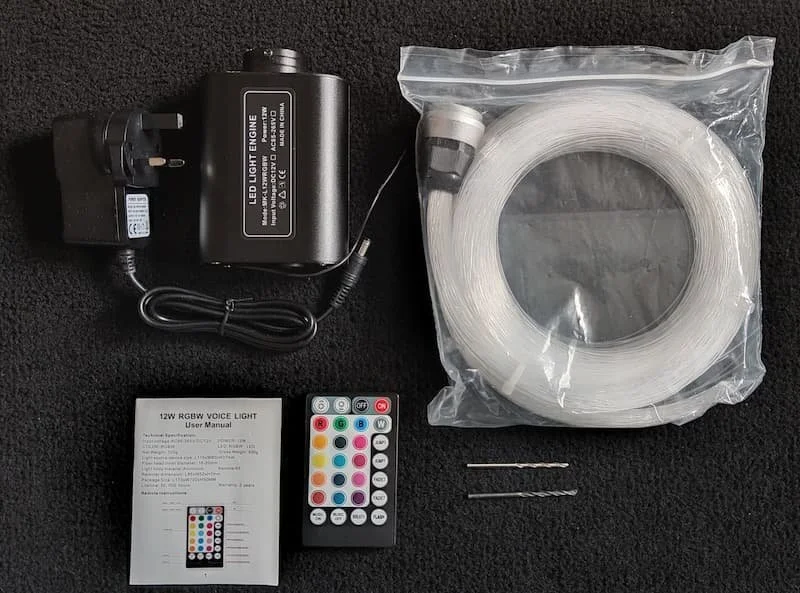
Once you receive your light engine and optical fibre, make sure you test the fibre optic star ceiling kit to ensure it works as expected. If you identify any damage to the product, do not install or test it out before consulting with us first. Please note that the remote controller comes without a battery.
Step 2: Prepare the ceiling space

If you are using large or multiple boards as your star ceiling panel, then make sure you reinforce them with timber (or other suitable materials) on the edges and in the middle. We recommend that you securely place the board on work-stands. This is so that you can easily work on the back of the panel while being able to pull the fibres through from the bottom (visible) side.
If you are using multiple boards, plan the order in which they will be lifted and secured before distributing the fibres. Where the boards share the same fibre optic bundle, allow sufficient additional fibre length so each board can be positioned and secured individually without pulling, sharply bending or placing tension on the fibres.
If you do not have the right access to ceiling space, then you can create a frame that is big enough to house the panel. It will need to be deep enough to house the light engine comfortably. If you do this, then you will need to fit the fibre optic tails into the board will take place before securing the board to the frame.
Step 3: Paint or cover the visible side of your board
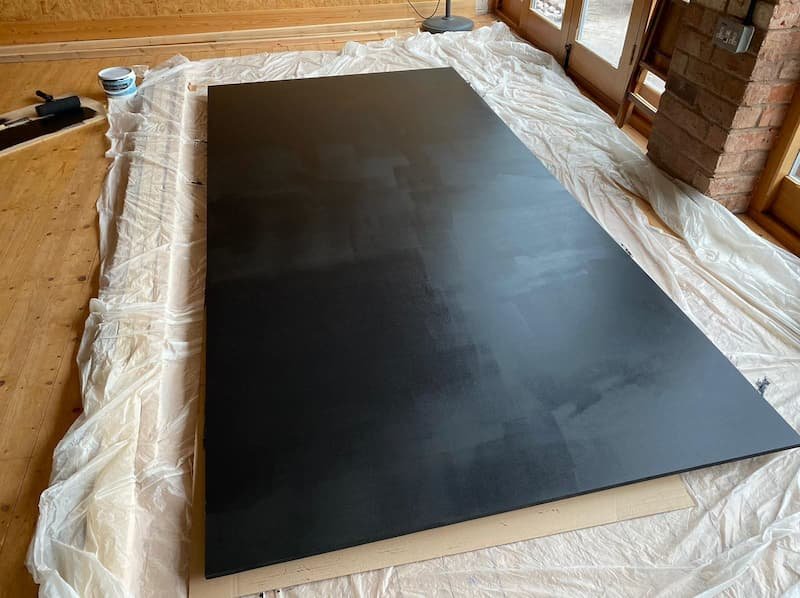
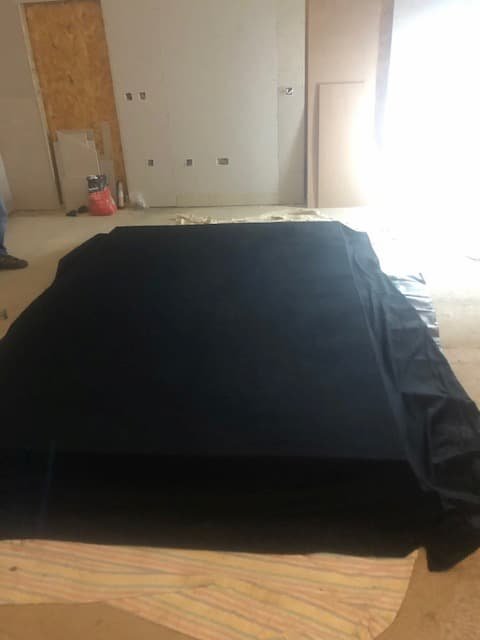
You can either paint your board or use fabric to cover it. Neither option is better than the other; it’s down to your own personal preference.
If using paint, then make sure you apply at least two or three layers to ensure a smooth finish.
If using fabric, firstly, spray the adhesive over the visible side of the board and attach the fabric. Work out any bubbles or creases with your hands or a roller, then secure them on the backside of the board with more adhesive spray. If you’re covering the board with black fabric, then you’ll need to ensure you are working off the ground or in a clean workspace when attaching the fabric to the board. Otherwise, you will end up getting dust and sawdust on part of the fabric; and this is time-consuming to remove.
Step 4: Decide on the light engine’s position
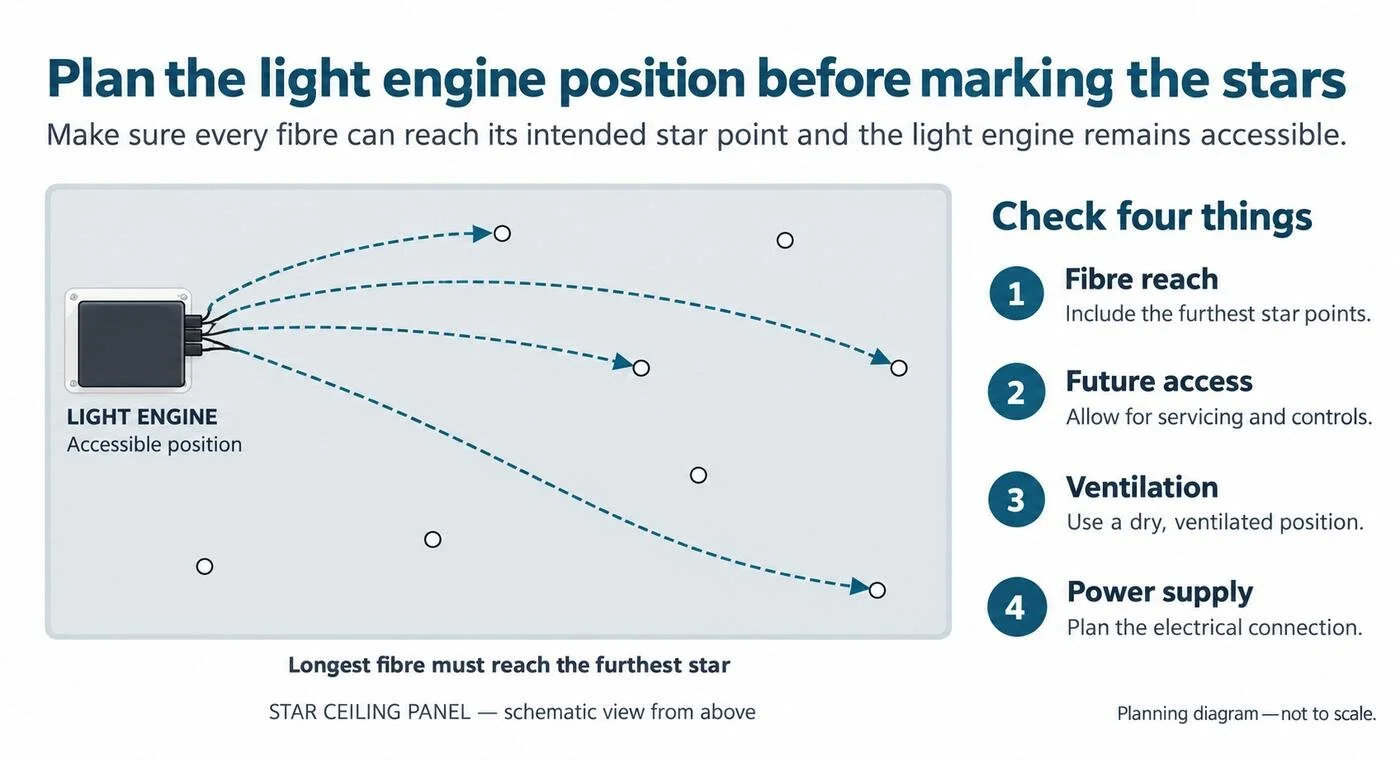
Before mapping out the stars, we recommend deciding where the light source will be placed above the ceiling. This will be the starting point for the optical fibre bundle.
When you decide on the light engine’s location, consider the following factors:
The light engines should always be placed in a dry location with good ventilation to avoid short circuits and prolong their lifetime.
It should also be accessible in the future in case of technical issues or if you should wish to change the light engine.
The distance of the light engine’s connector ports to the furthest star points on the board.
The electrical connection for the light engine.
Once you have decided on the light engine’s position, mark where it will go on the board. Place the fibre optic bundle from your kit on that mark before inserting the fibres.

Step 5: Mark your star points
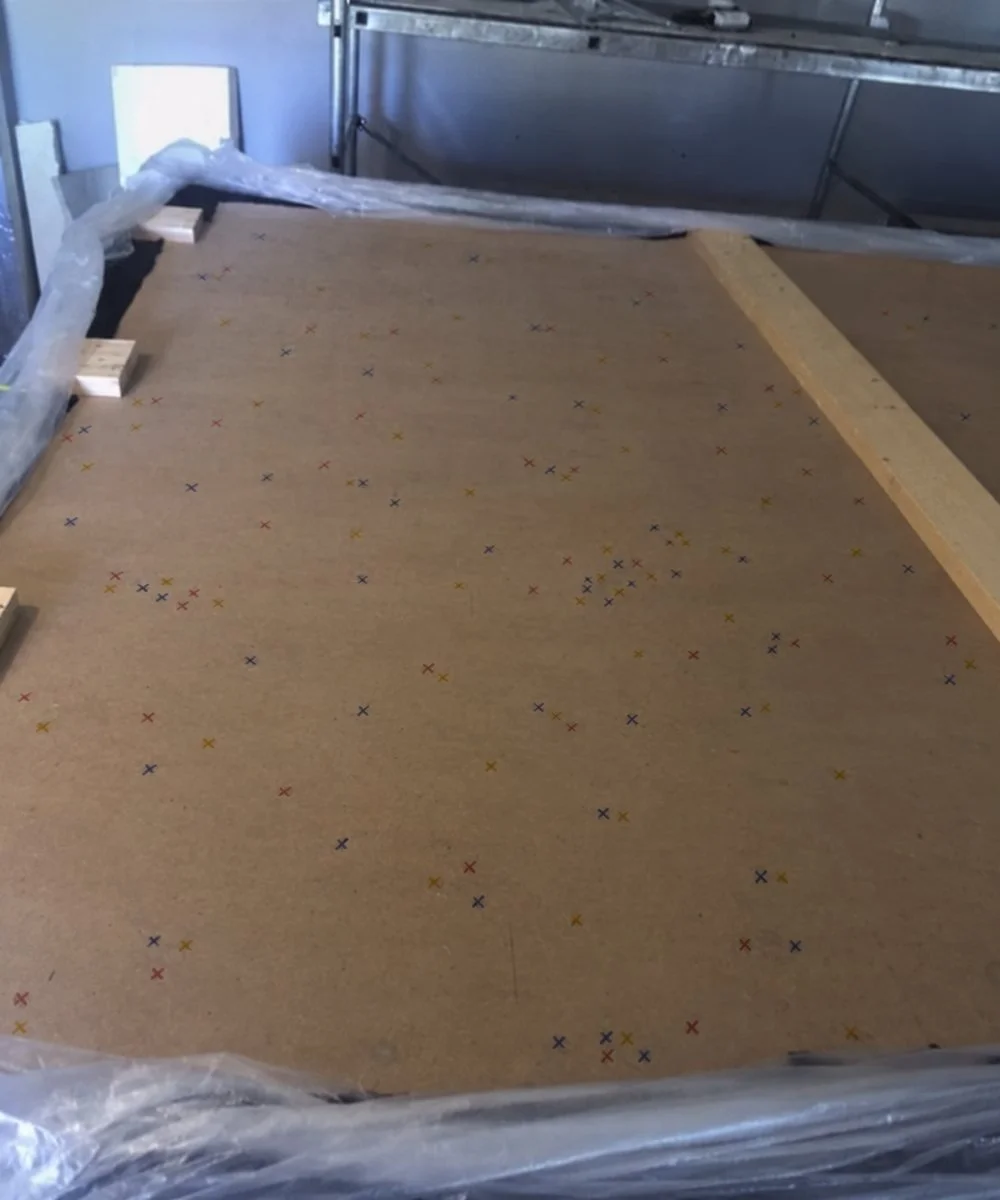
Refer back to the star density and total fibre count you decided on during the planning phase. Your goal here is to translate that plan onto your board.
Also, keep in mind the planned light engine location. Make sure the engine is positioned so all fibre lengths can reach their intended star points, especially the furthest ones. This is particularly important if your fibre bundle includes various lengths.
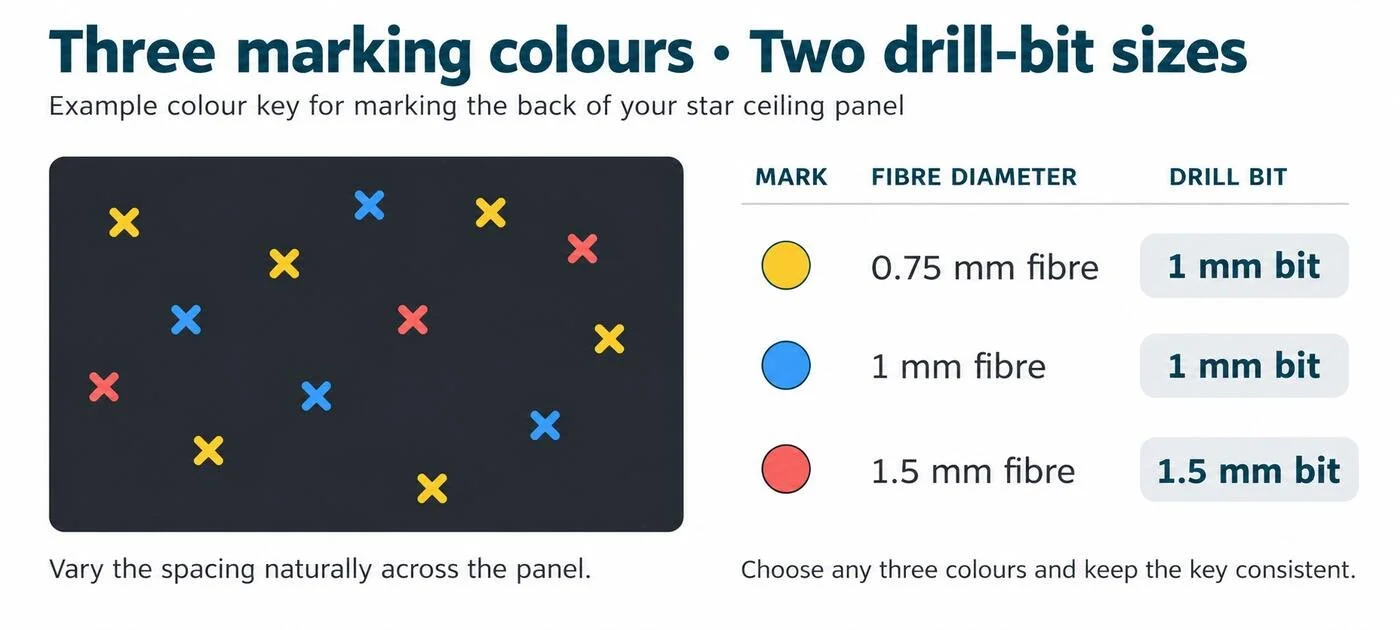
Using three different coloured marker pens, draw circles or crosses on the back of the board to plot where you will drill the holes for the star points. Use a different colour for each fibre diameter in your mixed bundle—for example, 0.75mm, 1mm and 1.5mm—and ensure the number of marks in each colour corresponds to the quantity of each diameter in the bundle.
Although three colours are used for marking, only two hole sizes are needed: use a 1mm drill bit for both 0.75mm and 1mm fibres, and a 1.5mm drill bit for 1.5mm fibres.
If you want to achieve a “night sky” effect, make the marks random but spread across the whole surface. Some areas can be denser than others, just like real stars in the sky. Alternatively, create a specific pattern or replicate constellations of your choice.
Tip: To recreate a particular constellation or star pattern, you can project the desired design onto the board or ceiling and mark the exact star points before drilling.
Remember to draw a mirror image of your desired design, so it appears correctly from below once installed.
Step 6: Drill holes for fibre optic stars
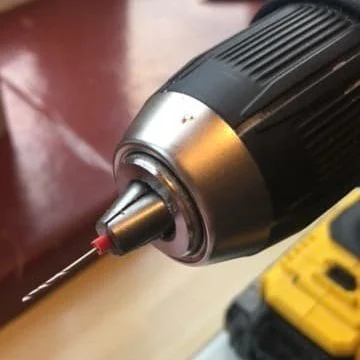
Using the 1.5mm drill bit, you need to drill through your pre-plotted largest star points from the backside through to the visible side of the board. Do the same for the 1 mm, and then the 0.75mm fibres.
Please note that we only provide 1mm and 1.5mm drill bits; this is because the 1mm drill bits are suitable for both the 0.75mm and the 1mm diameter fibres. We recommend using a drill chuck extension to hold the smaller drill bits in place. Alternatively, you can use a combination of electrical and aluminium tape around the base of the drill bit to hold it in place.
These drill bits are fragile, so be careful while using them.
Step 7: Insert the fibre optic tails in the drilled holes
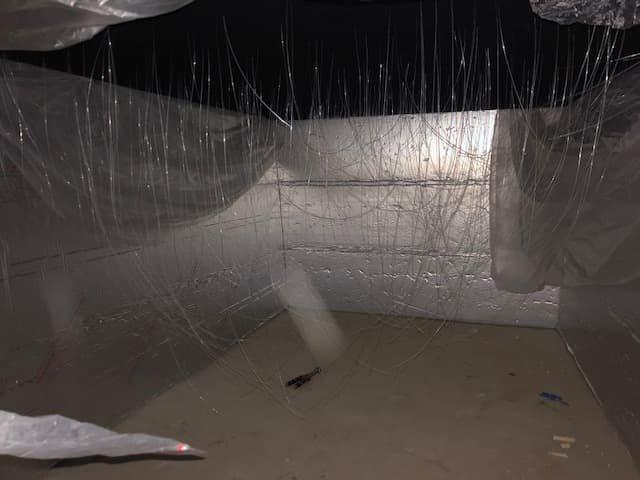

Starting with the shortest fibres first, take out the largest diameter first and thread them through the largest holes drilled nearest to the light engine mark made earlier. Pull them through from the underside, or if access is a problem, thread them through as far as they can go, so the cables are fairly neat.
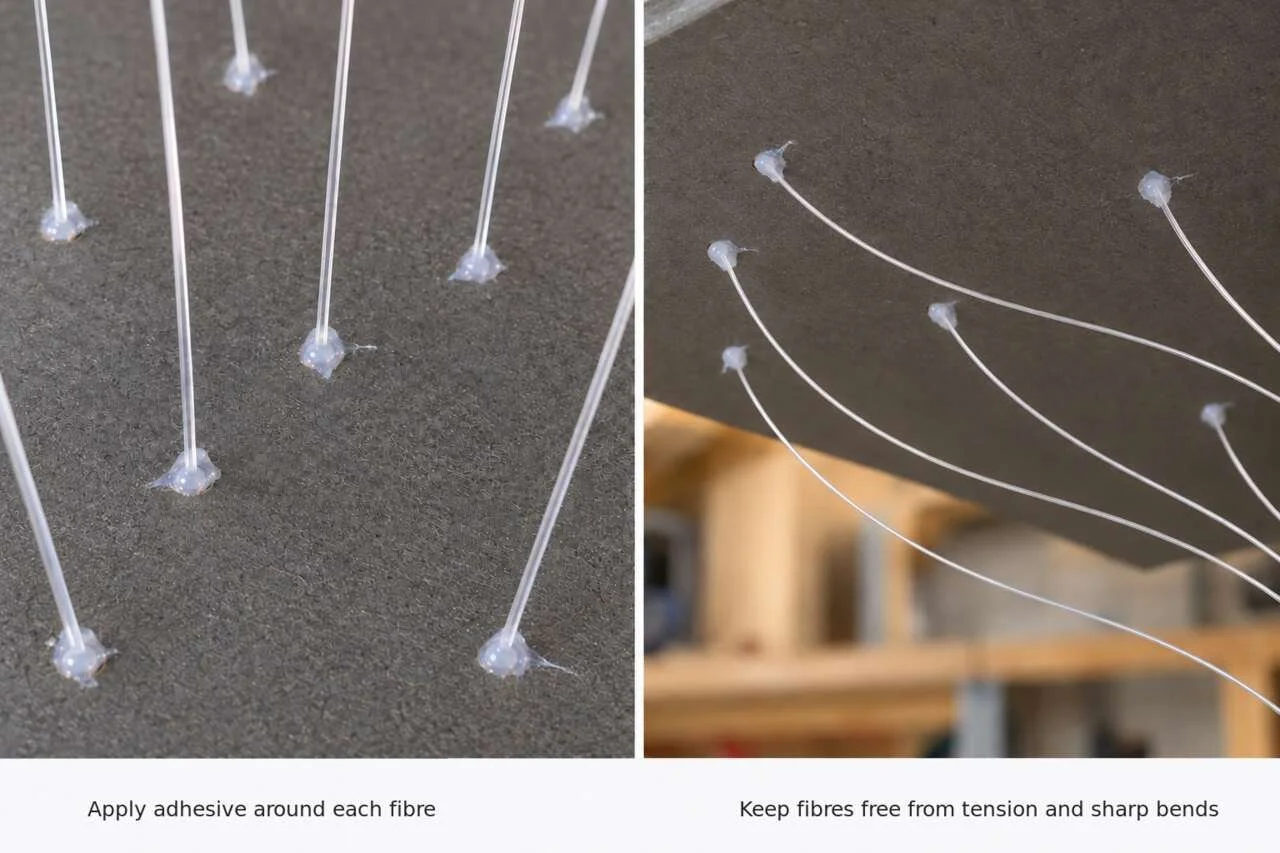
When pulling through the fibres, ensure they are not too tense and that they do not have sharp bends or breaks as this would reduce the light intensity at the fibres’ endpoints. Continue this process with the 1mm and 0.75mm fibres, and then move on to the next length fibres and repeat until all the fibres have been thread through the pre-drawn holes.
Step 8: Secure the fibres
Using solvent-free silicone, epoxy glue or a low-temperature glue gun (under 70°C), secure the fibres by applying a small dot at each hole and allowing it to dry. This will stop the optical fibres from falling back through the holes when you secure the panel to the ceiling. Again, ensure the fibres are not too tense and do not have sharp bends or breaks.

Step 9: Tidy up time!
We’re almost done! However, these final stages are essential if you want to make sure everything looks exactly how it should. With all the time and effort that you’ve invested learning how to make starry night ceilings, it’s important you do a thorough job on the tidy-up aspects.
The back of the board

Once the glue has dried, neaten up any unruly fibre cables and tape down using the black cloth tape. This step just helps flatten down some of the cables even more and stops them from getting tangled. Make sure the fibres don’t break during this process.
The visible side of the board

If you have easy access to the visible side of the board, cut the fibres to a more manageable length. For example, 10-15cm of each wire hanging through.
We’re almost done! However, these final stages are essential if you want to make sure everything looks exactly how it should. With all the time and effort that you’ve invested learning how to make starry night ceilings, it’s important you do a thorough job on the tidy-up aspects.
The back of the board
Once the glue has dried, neaten up any unruly fibre cables and tape down using the black cloth tape. This step just helps flatten down some of the cables even more and stops them from getting tangled. Make sure the fibres don’t break during this process.
The visible side of the board
If you have easy access to the visible side of the board, cut the fibres to a more manageable length. For example, 10-15cm of each wire hanging through.
Step 10: Secure the board to the ceiling

This step depends greatly on your individual scenario, including whether you are using an installation frame or a ceiling recess and whether you have access to the ceiling area from above. You will also need to plan how the fibre bundle will connect to the light engine. If the light engine is positioned away from the panel, make sure the bundle connector can still be attached and secured to the light engine’s port after the panel has been fixed in its final position.
Depending on the size of the board, you might need 2-4 people to help you. Plasterboard props are a great help to hold the board in place whilst you secure the panel to the frame or joists.
Step 11: Cover the screws
You can cover the screws with black felt self-adhesive dots as they will not be noticeable amongst the black fabric. If you’ve painted the board to a specific colour, paint the dots with the same colour prior to applying them over the screws. This may seem like a minor point, but where the aesthetics are concerned, it will make a huge difference and should not be overlooked.
Step 12: Cut the fibres

Using wire cutters or nail clippers, cut the remaining length of the wires down to your desired length. If your panel is covered with fabric, then make sure you do not cut them completely flush, as the fabric can cover the end of the fibres. Leaving the fibres a little bit longer creates a halo effect around each fibre, and it looks really good. Test the effect as you cut shorter and stop at your desired length. You can get a more interesting night sky effect by cutting the fibres at a variety of angles.
If you plan to paint your ceiling or board after the panel is fitted, leave 5-10cm of fibre hanging out until you finish painting. Then, you can cut them short, as the light is only emitted at the end of the fibres.
Step 13: Finish – turn on the lights

Your panel is now ready, and you can enjoy the beautiful night sky that you have lovingly created yourself. You can scroll through the light engine’s programmes with the remote controller and set the panel to your desired mood. If the light engine you’ve purchased is Bluetooth app-enabled, don’t forget to set that one up too. Sit back, relax, and enjoy your stunning star ceiling masterpiece!
5. How to make a starry night sky ceiling - Frequently Asked Questions
5.1 Planning phase
Q: Where can you install a fibre optic star ceiling kit?
A: As the light source sits above the ceiling and the fibre optic tails pass through it, you will need access to the area above the ceiling, such as a loft or sufficient space in a ceiling void. Alternatively, you can create a housing, recess or frame for the board to accommodate the light engine and optical fibres.
The board can be made from a range of materials, including plasterboard, acrylic sheets (Perspex or Plexiglas), PVC, Dibond, or wooden boards such as MDF or HDF. Fibre optic stars can also be installed in stretch ceilings. In this guide, we use an MDF board to accommodate the optical fibres, but the steps can be adapted to suit other installation methods.
Q: Can you prepare multiple independent star ceiling panels?
A: Yes. A dual-port light engine allows one engine to power two separate fibre bundles. Current dual-port models include MK-S20 RGBW-T, LEK-432 APP, LEK-432 DMX, LEF-1002B DMX APP and LEF-432B DMX APP. For more than two panels, or where your budget allows a separate light engine for each panel, DMX-enabled light engines offer another option. Each panel can have its own light engine and fibre bundle, with compatible engines linked by DMX for synchronised control. For projects involving multiple panels, you can also use our modular fibre optic kits, which make handling and connecting separate panels much easier.
Q: Can I create constellations like the Big Dipper?
A: Absolutely! When you are marking your star points (Step 5), you can print a mirror-image template of your desired constellation and use it as a guide for drilling your holes. Using slightly larger diameter fibres for the main stars in the constellation can make them stand out.
Q: What if my ceiling is not a simple rectangle?
A: No problem. Calculate the total square meterage of the area as best you can. For L-shaped rooms, calculate the area of each rectangle and add them together. The key is to get a good estimate of the total area to ensure you buy enough fibres.
Q: Can I add more stars later?
A: It's much easier to install all the fibres at once, so we recommend opting for a slightly higher star count than you think you need during the initial installation. However, if you are considering a future expansion, you should choose a DMX-compatible light engine. This will allow you to add another light engine and fibre bundle later on. By connecting the units with a DMX cable, they will operate in sync from a single remote control.
Q: I don’t have the time or tools to make my own. Can you make it for me?
A: Yes, we offer a range of ready-made starlight ceiling panels. You can choose from fibre optic panels or easy-to-install LED star ceiling panels, which provide a beautiful effect with less DIY work involved.
Q: Can I add a Northern Lights effect?
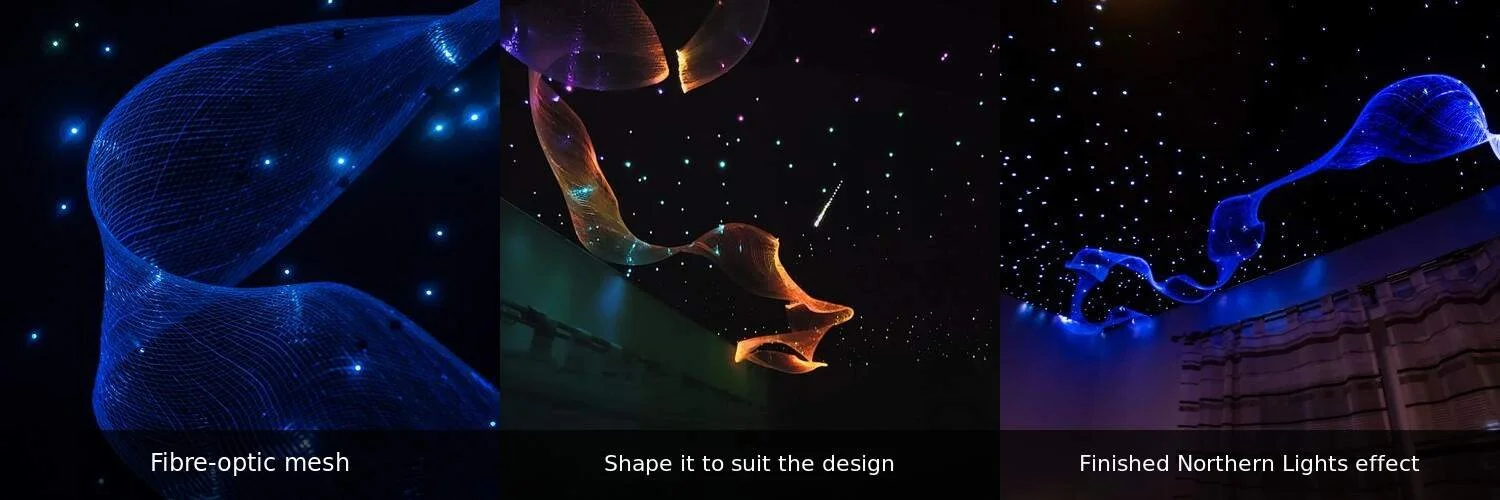
A: Yes. Our Northern Lights fibre optic mesh can be used alongside individual star points to create a flowing band of light. The 7m side-sparkle mesh is approximately 9–10cm wide and can be spread to around 40–50cm. It can also be used creatively — stretched, twisted, hung or wrapped around a feature to suit the design. It requires a compatible light engine port, so include it when planning your bundles, ports and light engines.
Q: Can I create letters, logos or other custom patterns?
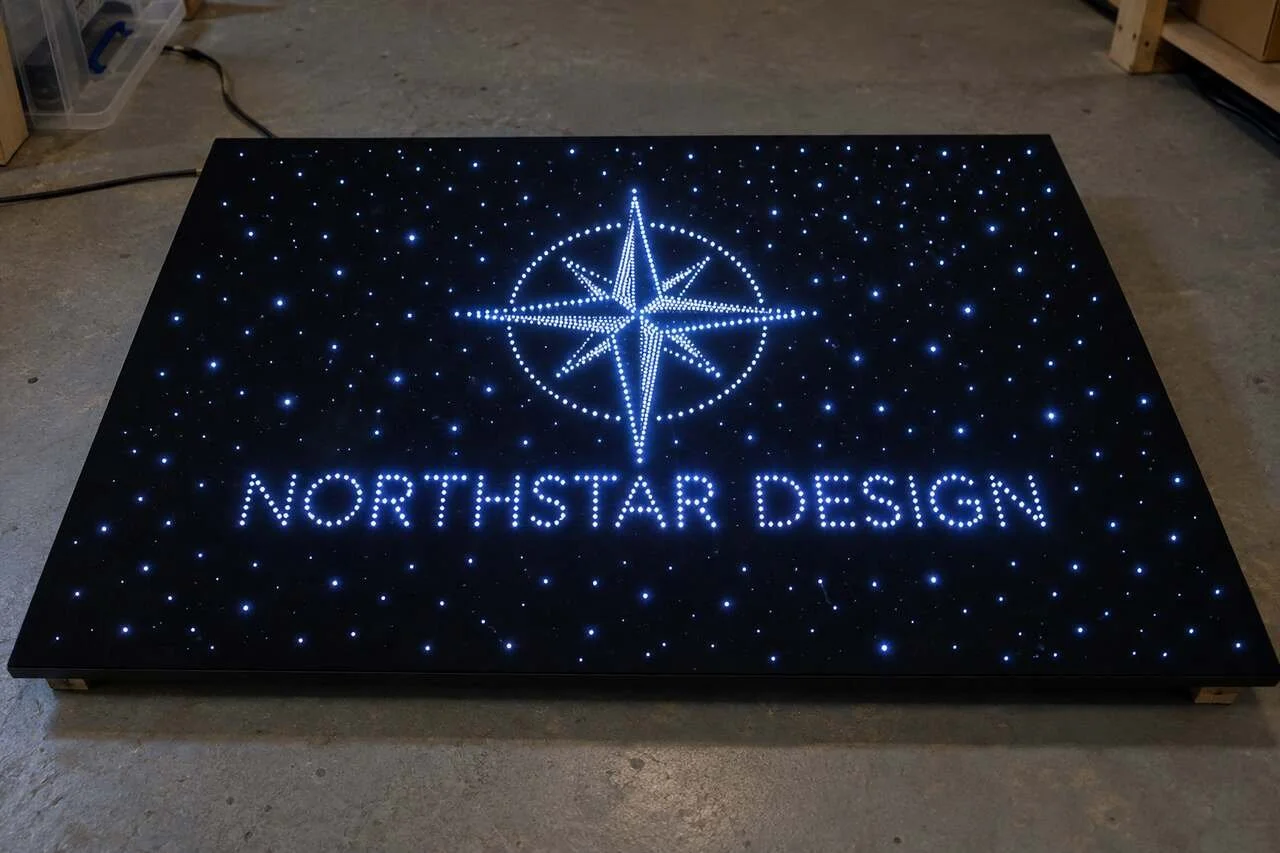
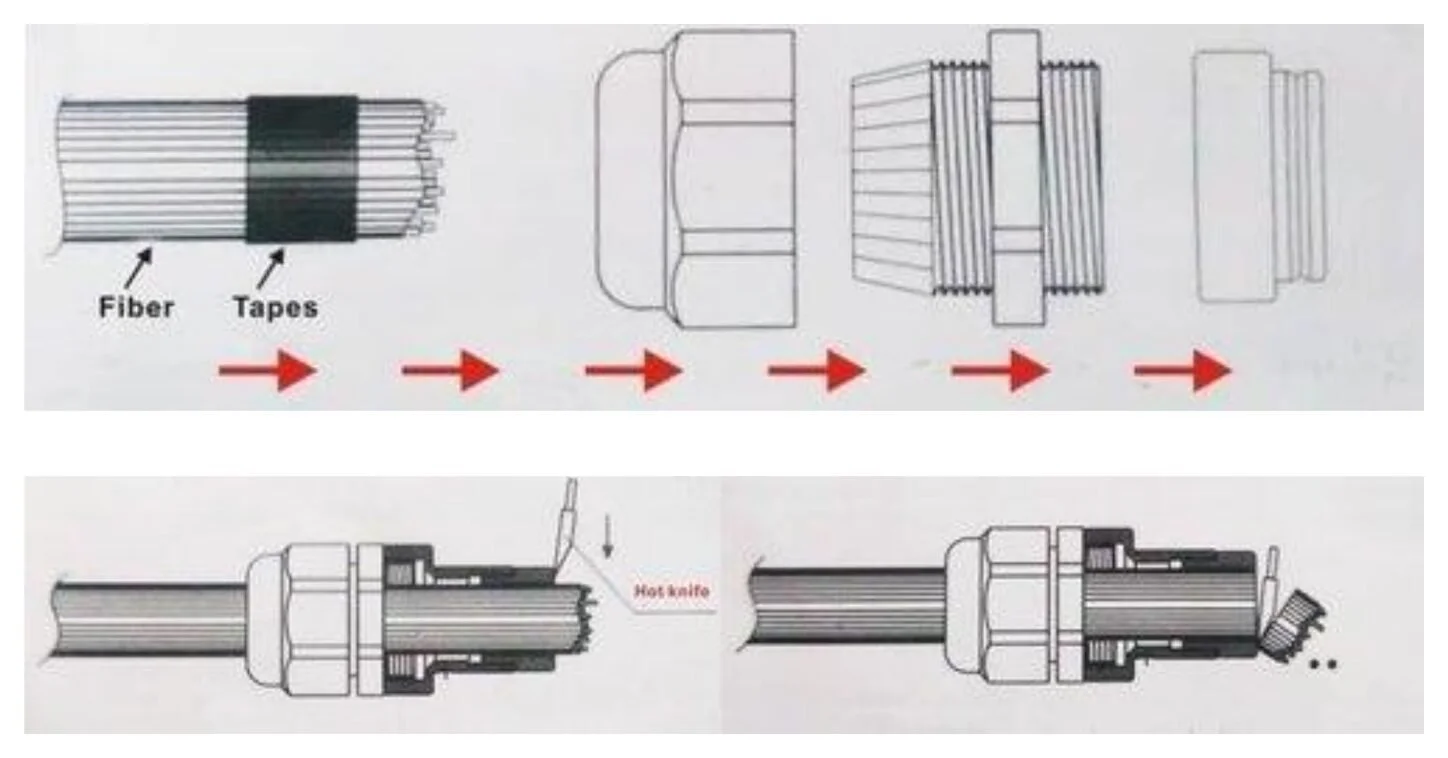
A: Yes. Letters, logos or other patterns can be incorporated into the main star ceiling using the same kit. If you want to control the custom design independently from the surrounding stars, use a separate kit and light engine. A spacing of around 1–1.5cm between fibres usually works well for defined lettering and patterns. You can create your own bundle using our 100m optical fibre options or complete PMMA fibre reels. Once the design and fibre count are finalised, you can select a suitable connector and light engine; DMX-compatible light engines can also be synchronised for larger projects.
Q: Can I add a shooting star effect?
A: Yes, but it is created differently from the twinkling starry-sky effect. A shooting star uses multiple groups of fibres that light up one after another to create the appearance of movement. It therefore requires a separate shooting-star light engine and fibre bundle; it cannot be powered by the same light engine as the main twinkling star ceiling. The SS-300 is suitable for smaller installations, while the LEN-3012 DMX is designed for larger ceiling areas.
How to create a shooting star effect in a fibre optic star ceiling
Q: How quickly will my order be delivered?
A: In-stock products are dispatched from our UK warehouse using Royal Mail Tracked 48 or DPD next-working-day delivery, depending on the order. Pre-order items are subject to the lead time shown on the product page, while custom-made fibre optic bundles usually take 2–3 weeks.
5.2 Installation
Q: How long does it take to install a fibre optic star ceiling kit?
A: The time can vary, but for a 3-square-meter panel with about 200 fibres, you can expect the project to take roughly 8-9 hours. This includes building the frame, preparing the panel, drilling the holes, and installing the fibres.
Q: Will I need to hire an electrician to install it?
A: Our light engines come with a standard three-pin UK plug. However, if your installation requires new wiring to provide power to the light engine's location, it is important to have this work done by a trained and competent person. Where possible, provide a switched socket or wired wall switch so the light engine can be powered down when it will not be used for longer periods.
Q: Can I install the star ceiling kit in a bathroom, steam room, or sauna?
A: Yes. The optical fibres are safe for wet environments as they carry no electricity. However, the light engine must be installed in a dry, well-ventilated location. For the high humidity and temperatures in steam rooms and saunas, we specifically recommend using our PVC coated fibres for maximum durability.
Q: Do I need to be able to access the light engine after it’s been installed?
A: Yes, you should always plan your installation so you can access the light engine. This is necessary for any future maintenance, such as re-pairing a remote or servicing a part. An access hatch or a removable panel are great solutions.
5.3 Cleaning and maintenance
Q: What is the lifespan of the light engine and the fibres?
A: The LED light engines are highly durable, typically rated for 50,000 hours or more of use. The fibre optic strands themselves don't have a lifespan as they contain no electronics and do not burn out; they simply carry light from the engine and should last indefinitely.
Q: What warranty is included?
A: Most products include a 12- or 24-month warranty, depending on the item. The exact warranty period is shown on the relevant product page. If your kit contains components purchased separately, check the warranty information for each item. Opening or damaging the light engine casing will void its warranty, so please contact us before opening it if you require assistance.
Q: How do I clean the finished star ceiling?
A: Cleaning is simple. You can use a feather duster or a soft microfiber cloth to gently remove any dust from the ceiling surface and the fibre ends. For any marks, use a slightly damp cloth, but avoid using harsh chemical cleaners.
Q: My remote control isn't working. What should I do?
A: First, try replacing the battery. If that doesn't work, your RF remote may need to be paired with the light engine again; please check your user manual for instructions. If the issue persists, please contact us for support.


6. Important safety guidance - Must read!
Please do take care while working at a height by carrying the tasks out in a safe manner. At least two people are required for the installation; for larger panels, you may need additional help. Star kits should only be installed on dry and smooth surfaces. Wet surfaces (including fresh paint) contain moisture that could short circuit the light engine.
Electrical work should only be performed by trained and competent persons with sufficient skills and knowledge to avoid danger. If in any doubt, we recommend engaging the services of an approved electrician.
The cooling holes of the light casing should not be covered while in operation.
The light engine should be placed in a dry, well-ventilated, and accessible location.
Opening or damaging the case of the light engine will void the warranty.
We do not take responsibility for any damage caused by improper installation.
If you have any questions, problems, or comments regarding the installation or the operation of your starlight kit, please contact us at info@stellarlighting.co.uk. Once you’ve completed your DIY star ceiling, we’d love to see a picture! We look forward to seeing your finished projects online soon.
7. Need help? Contact us for free professional advice
Our team of experts is here to guide you every step of the way in creating your perfect star ceiling. Whether you have questions about installation, design ideas, or product selection, we're dedicated to helping you achieve the starlit paradise of your dreams. Reach out to us today and let's turn your vision into a reality!
Make your home sparkle with Stellar Lighting's DIY fibre optic star ceiling kit!